The Call Microsoft Scam
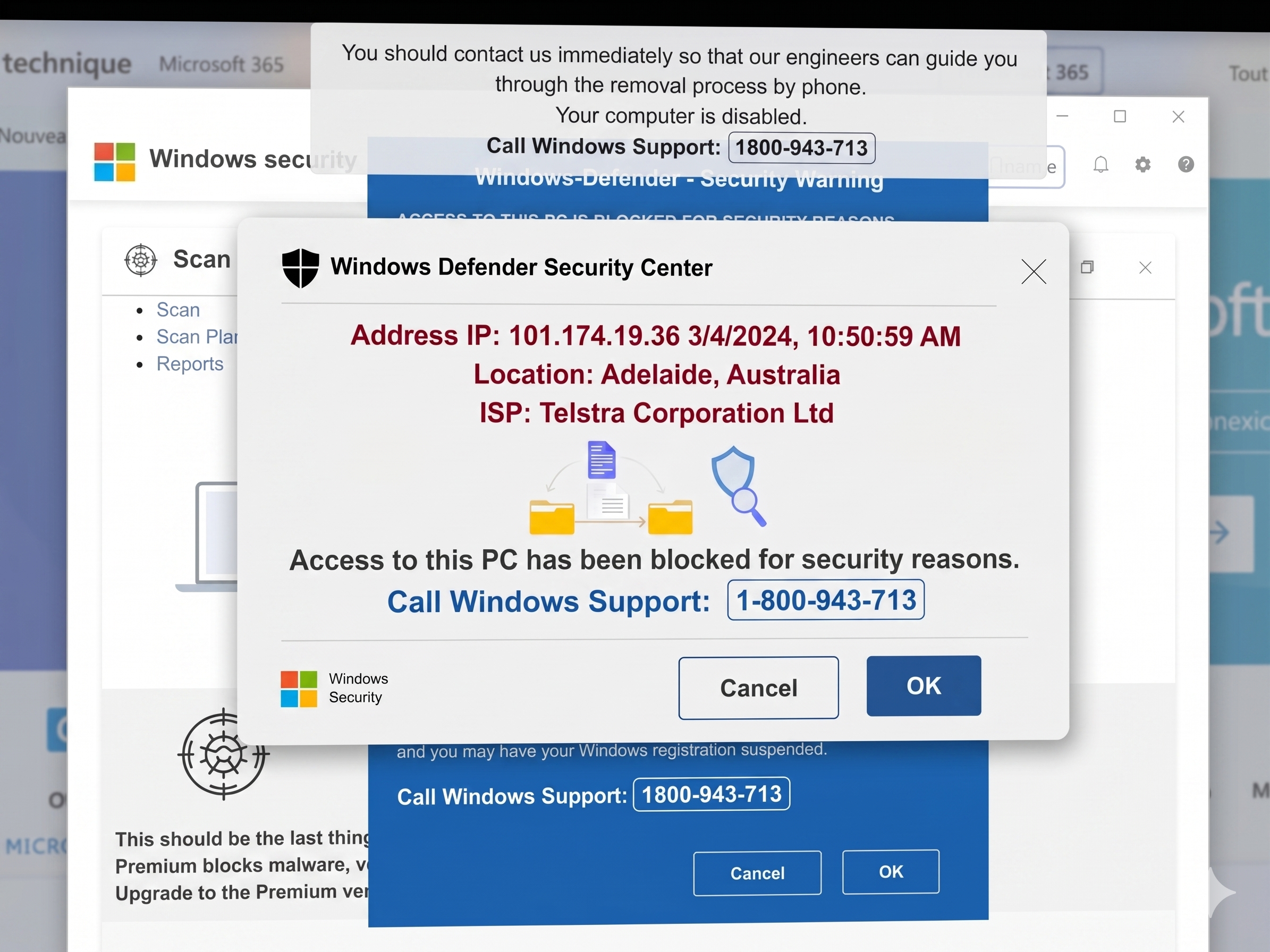
The "Call Microsoft" scam is a type of tech support fraud designed to panic you into calling a fake helpline. These alerts are almost never the result of an actual virus on your computer; instead, they are clever web-browser tricks meant to simulate a system crash.
Here is how these scams appear and operate on your screen:
1. The Entry Point: Malvertising and Redirects
You don’t usually have to click a "bad link" for this to happen. Scammers use several subtle ways to push these alerts to your browser:
Malicious Ads (Malvertising): Legitimate websites (even news or weather sites) sometimes display ads from third-party networks. Scammers can "inject" malicious code into these ads that triggers a redirect to a scam page the moment the ad loads on your screen.
Typosquatting: If you mistype a URL (e.g., typing gogle.com instead of google.com), scammers often own those misspelled domains and set them up to immediately launch a fake warning.
Compromised Sites: Older or less secure websites may be hacked, which I am seeing more and more causing any visitor to be automatically sent to a scam "landing page."
2. The Visual Illusion (The "Blue Screen")
Once you land on the scam page, the browser is instructed to look like a system-level error:
Fake BSOD: The page often uses a bright blue background with white text, mimicking the Windows "Blue Screen of Death."
Logo Impersonation: They use high-resolution Microsoft, Windows, or McAfee logos to look official.
Overlays: The scam page creates "pop-up" windows within the browser that look like Windows Defender alerts, complete with fake "Error Codes" (e.g., Error #0x80041003).
3. Psychological Pressure Tactics
The goal is to stop you from thinking clearly. Scammers use:
Audio Alerts: Some pages play a loud, looped siren or a robotic voice saying, "Your computer is infected! Do not shut down or your data will be lost."
Full-Screen Mode: The website will often force your browser into Full-Screen Mode (F11). This hides your taskbar and the "X" button, making it feel like your entire computer is locked, when in reality it is just one browser tab.
JavaScript Loops: If you try to close the tab, a "Confirm Navigation" box may keep reappearing instantly, preventing you from leaving the page easily.
4. The "Call to Action"
Every one of these scams includes a toll-free number.
Important: Microsoft will never include a phone number in a system error message or security pop-up. If there is a phone number on your screen telling you to call for support, it is 100% a scam.
How to Safely Escape
If you see one of these screens, do not call the number and do not click anywhere on the page.
Force Close the Browser: Press Ctrl + Shift + Esc to open the Task Manager. Find your browser (Chrome, Edge, etc.) and click End Task.
Clear the Session: When you reopen your browser, it may ask if you want to "Restore Pages." Click No. If you click "Restore," the scam page will pop right back up.
Check for Adware: If these pop-ups happen frequently on many different sites, you may have a malicious browser extension or "adware" installed on your computer. Check your browser extensions and uninstall anything you don't recognize.
If you need assistance with this or a full security check on your home computers and devices please CONTACT ME